Secure Access for Government
First and second steps of Secure Access for Government trial creation are described in Start a New Trial.
Package details
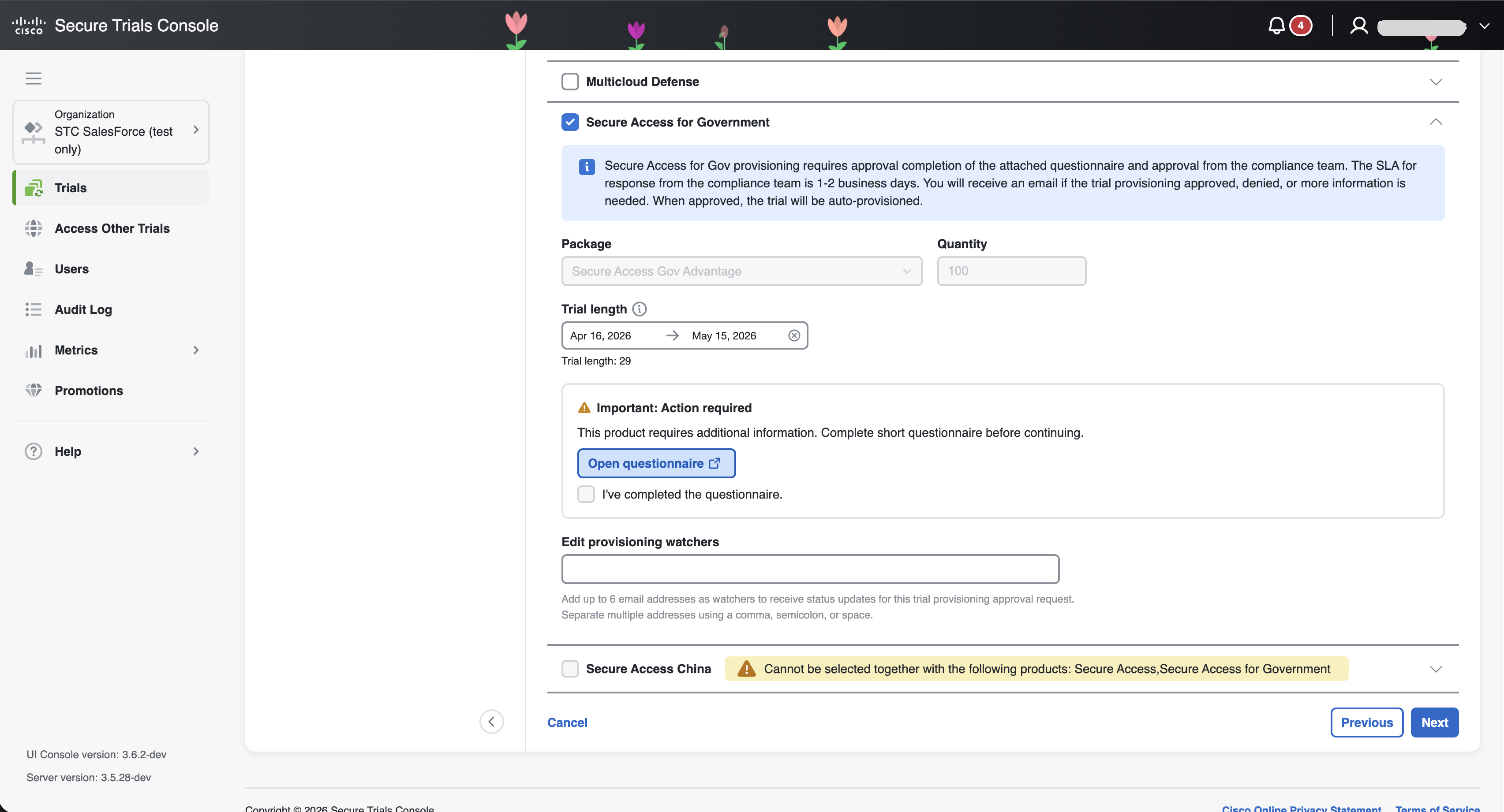
STC offers Secure Access for Government with one predefined package and fixed quantity, without editing options. You can set the start and end dates within a 90-day range. Package are next:
-
Secure Access Gov Advantage, with quantity 100;
You can configure up to six provisioning watchers. These recipients will receive email notifications regarding status updates for Secure Access for Government provisioning. After creation, you can manage these watchers on the Trial Info page, provided the trial has not yet been approved.
Important | Secure Access for Gov provisioning requires approval completion of the attached questionnaire and approval from the compliance team. The SLA for response from the compliance team is 1-2 business days. You will receive an email if the trial provisioning approved, denied, or more information is needed. When approved, the trial will be auto-provisioned. |
Also, keep in mind that Secure Access for Government cannot be selected together with the Secure Access and Secure Access China products.
See how Secure Access for Government appears during trial provisioning in the image below.
When a seller completes the trial creation wizard, an approval request is automatically sent to the compliance team. At this stage, the trial receives the status "Pending approval". The compliance team then reviews the request to ensure all requirements are met. To get familiar with approval process visit Approval Requests